Awakado $9.99 · one time

Awakado for macOS

Your agents keep working. So does your Mac.

Awakado is a menu-bar app that keeps your Mac awake for a set time, or exactly as long as Claude Code, Codex, Gemini CLI or Cursor are working. Close the lid and walk away. When the work is done, it sleeps.

Coming soon for MacSee pricing
  • Free for every agent
  • Pro $9.99, one time
  • Free updates for life
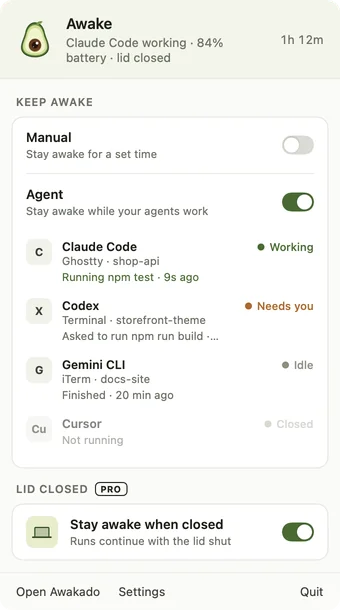
The Awakado menu: Agent mode on, Claude Code working, Codex waiting, lid-closed mode on

Two switches. That's it.

Turn on Manual for a set time, Agent for as long as your agents work, or both. Awakado shows what each agent is doing, so you know the Mac will stay up, and lets it sleep the moment the work is done.

Agent mode

It knows when an agent needs you

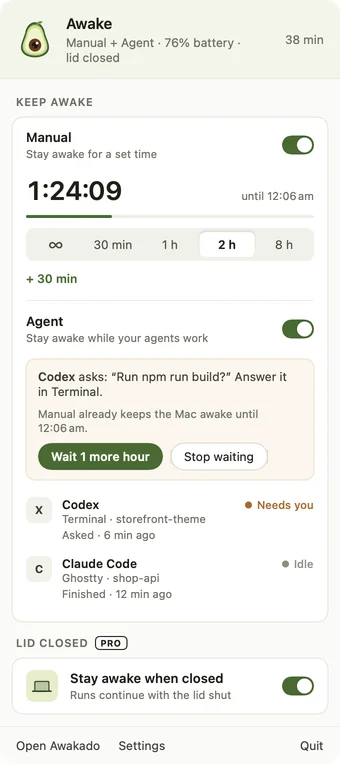
Every agent gets a live line: working, waiting on you, stalled or done, with the app and project it's in. When one asks a question, Awakado shows it and keeps the Mac awake a while longer so the run doesn't die waiting. When they all finish, the Mac sleeps.

Awakado menu with Manual and Agent mode on, and a card saying Codex is asking a question

Lid closed · Pro

Close the lid. Come back to a summary.

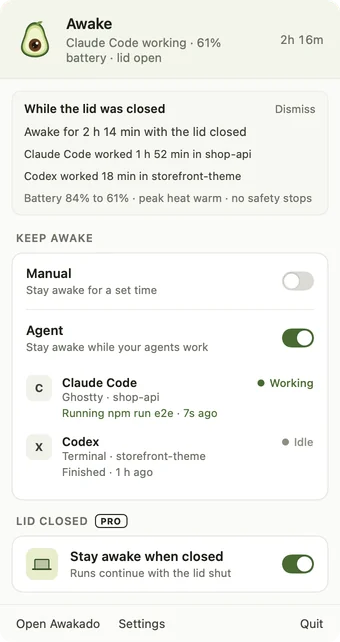
Keep going on power or battery with the lid shut. The screen switches off to save battery, a chime confirms it's still running, and when you open the lid you see how long it ran, what each agent did and how the battery held up.

Awakado menu showing a summary of what happened while the lid was closed

The Awakado window

Everything at a glance

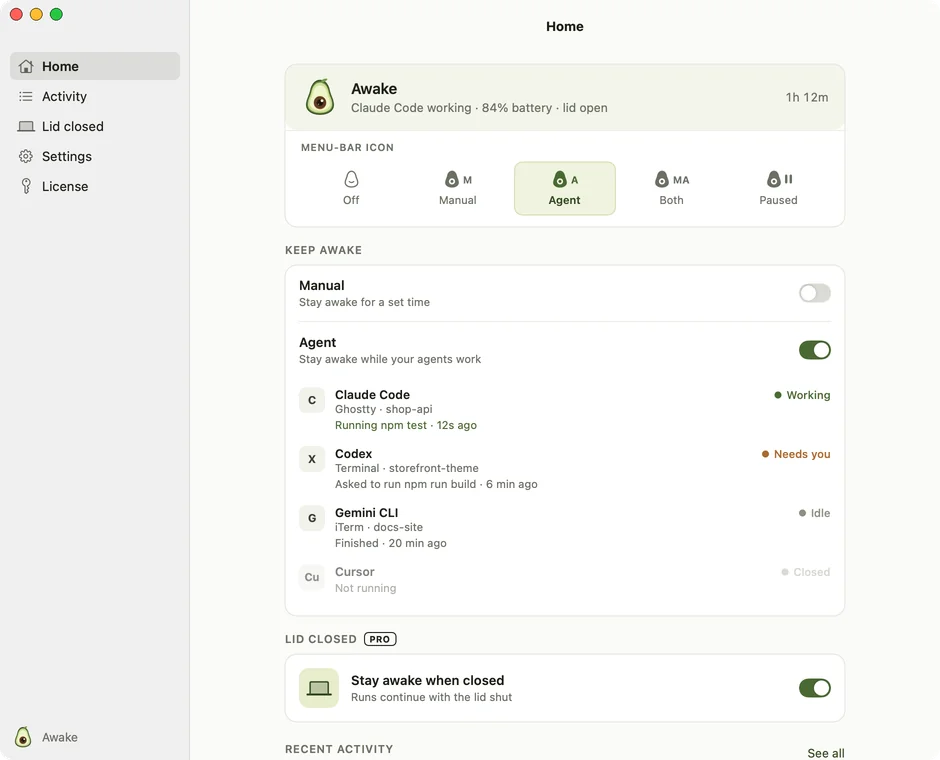
One window shows what's happening now, what every menu-bar icon means, and the latest activity. Keep Awakado in the Dock, or tuck it away in the menu bar.

The Awakado window: sidebar, status card with a legend of menu-bar icons, and the two modes

Safety

Safe by default

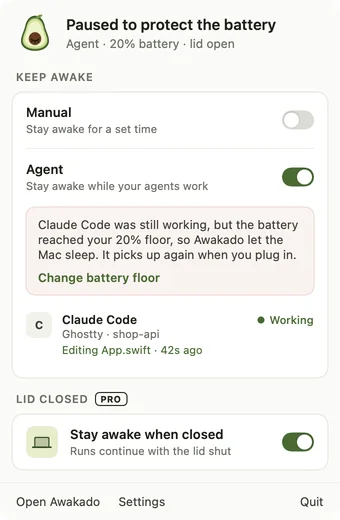
A battery floor and a temperature limit apply in every mode and can't be switched off. If Awakado ever stops, or the Mac restarts, normal sleep comes back on its own.

Awakado menu explaining it let the Mac sleep because the battery reached its floor

Pro

Built for runs you leave alone

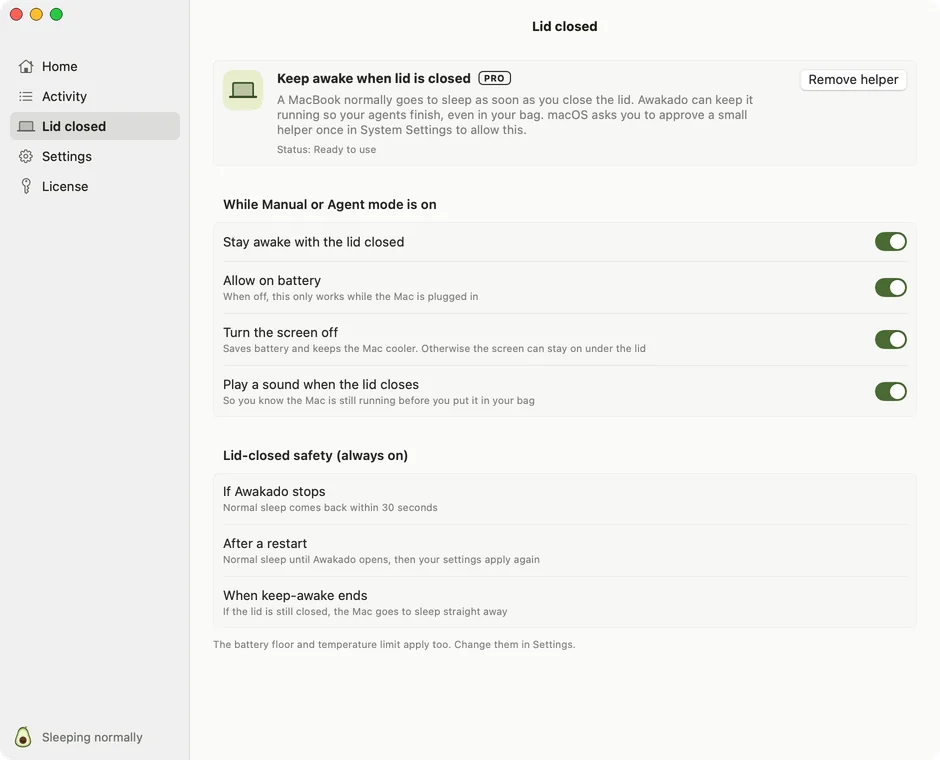
Choose whether lid-closed mode works on battery, turn the screen off, and play a sound when the lid closes. When a Claude Code usage limit hits, the Mac sleeps and wakes itself when the limit resets.

Awakado Lid closed settings with its safety checks

Manual mode

A timer, or no limit at all

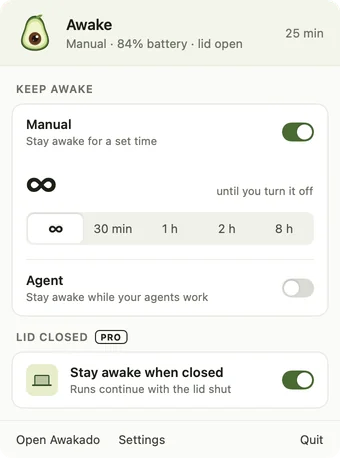
Keep awake for 30 minutes to 8 hours, add 30 minutes on the fly, or choose ∞ and it stays on until you turn it off.

Awakado Manual mode set to no time limit

Read it at a glance

The menu-bar icon always tells you what Awakado is doing.

Off
MManual
AAgent
MABoth
Paused

At a glance

What it is
A keep-awake app for Macs running AI coding agents
Works with
Claude Code, Codex, Gemini CLI, Cursor
Needs
macOS 14 Sonoma or later
Price
Free. Pro $9.99 one time, up to 3 Macs
Updates
Free updates for life
Privacy
No account, no analytics, nothing about your work leaves the Mac

Free, or Pro for less than lunch

Everything except lid-closed mode and usage-limit wake is free, for every agent. One payment for Pro, free updates for life, up to 3 Macs.

Free

$0

Direct download, Mac App Store later

  • Manual and Agent mode
  • Claude Code, Codex, Gemini CLI, Cursor
  • Battery and temperature safety
  • Activity log
Coming soon

Questions

What is Awakado?

Awakado is a menu-bar app for macOS that keeps a Mac awake while AI coding agents work. It sees Claude Code, Codex, Gemini CLI and Cursor through their own hooks, keeps the Mac awake while any of them is working, including with the lid closed, and lets it sleep as soon as the work is done.

Which AI agents does it work with?

Claude Code, OpenAI Codex, Gemini CLI and Cursor. Awakado adds a small hook to each one on first use, and your own hooks stay as they are.

Doesn't Claude Code already keep my Mac awake?

Only while the lid is open, and with gaps where the Mac can still doze off mid-task. Awakado covers every agent, closes the gaps, handles lid-closed runs and lets the Mac sleep as soon as the work is done.

How is this different from Amphetamine?

Amphetamine keeps your Mac awake while an app is open or for a set time. Awakado keeps it awake while your agent is actually working, and knows when it is waiting on you or finished.

Is it safe to run with the lid closed in a bag?

Awakado always stops at your battery floor and when macOS reports the Mac is running hot. Those limits can't be turned off, the screen switches off when the lid closes, and a crash or restart always brings back normal sleep.

How much does it cost?

Manual and Agent mode are free. Awakado Pro, which adds lid-closed mode and waking the Mac when a Claude Code usage limit resets, is a one-time $9.99 for up to 3 Macs, with free updates for life. There is no subscription.

Why isn't lid-closed mode in the App Store version?

It needs a small system helper that App Store apps aren't allowed to install. The direct download includes it.

Does it send my code or prompts anywhere?

No. Agents report to Awakado on your own Mac, and nothing leaves it except a licence check and update checks.